Transitions and events
A state machine is typically composed of a set of State, Transition, Event, and Actions. A state is a representation of the system’s current condition or behavior. A transition represents the change in the system’s state in response to an event or condition. An event is a trigger that causes the system to transition from one state to another, and action is any side-effect, which is the way a StateMachine can cause things to happen in the outside world.
Consider this traffic light machine as an example:
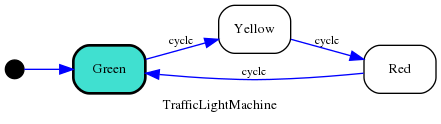
There’re three transitions, one starting from green to yellow, another from
yellow to red, and another from red back to green. All these transitions
are triggered by the same Event called cycle.
This state machine could be expressed in python-statemachine as:
 1from statemachine import State
 2from statemachine import StateMachine
 3
 4
 5class TrafficLightMachine(StateMachine):
 6    "A traffic light machine"
 7
 8    green = State(initial=True)
 9    yellow = State()
10    red = State()
11
12    cycle = green.to(yellow) | yellow.to(red) | red.to(green)
13
14    def before_cycle(self, event: str, source: State, target: State):
15        print(f"Running {event} from {source.id} to {target.id}")
16
17
In line 12, you can say that this code defines three transitions:
green.to(yellow)yellow.to(red)red.to(green)
And these transitions are assigned to the Event cycle defined at the class level.
Note
In fact, before the full class body is evaluated, the assigments of transitions are instances of statemachine.transition_list.TransitionList. When the state machine is evaluated by our custom metaclass, these names will be transformed into Event instances.
Transitions
In an executing state machine, a Transition is a transfer from one state to another. In a StateMachine, a Transition tells us what happens when an Event occurs.
A transition can define Actions that will be executed whenever that transition is executed.
Transitions can have Conditions allowing you to specify when a transition may be executed.
An action associated with an event (before, on, after), will be assigned to all transitions bounded that uses the event as trigger.
Hint
Usually you don’t need to import and use a Transition class directly in your code, one of the most powerful features of this library is how transitions and events can be expressed linking directly from/to State instances.
Self transition
A transition that goes from a state to itself.
Syntax:
>>> draft = State("Draft")

>>> draft.to.itself()
TransitionList([Transition(State('Draft', ...
Internal transition
It’s like a Self transition.
But in contrast to a self-transition, no entry or exit actions are ever executed as a result of an internal transition.
Syntax:
>>> draft = State("Draft")

>>> draft.to.itself(internal=True)
TransitionList([Transition(State('Draft', ...
Example:
>>> class TestStateMachine(StateMachine):
...     initial = State(initial=True)
...
...     external_loop = initial.to.itself(on="do_something")
...     internal_loop = initial.to.itself(internal=True, on="do_something")
...
...     def __init__(self):
...         self.calls = []
...         super().__init__()
...
...     def do_something(self):
...         self.calls.append("do_something")
...
...     def on_exit_initial(self):
...         self.calls.append("on_exit_initial")
...
...     def on_enter_initial(self):
...         self.calls.append("on_enter_initial")
Usage:
>>> # This example will only run on automated tests if dot is present
>>> getfixture("requires_dot_installed")

>>> sm = TestStateMachine()

>>> sm._graph().write_png("docs/images/test_state_machine_internal.png")

>>> sm.calls.clear()

>>> sm.external_loop()

>>> sm.calls
['on_exit_initial', 'do_something', 'on_enter_initial']

>>> sm.calls.clear()

>>> sm.internal_loop()

>>> sm.calls
['do_something']
Note
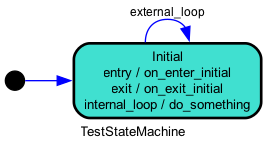
The internal transition is represented the same way as an entry/exit action, where the event name is used to describe the transition.
Events
An event is an external signal that something has happened. They are sent to a state machine and allow the state machine to react.
An event starts a Transition, which can be thought of as a “cause” that initiates a change in the state of the system.
In python-statemachine, an event is specified as an attribute of the state machine class declaration or directly on the Event parameter on a Transition.
Declaring events
The simplest way to declare an Event is by assigning a transitions list to a name at the State machine class level. The name will be converted to an Event:
>>> from statemachine import Event

>>> class SimpleSM(StateMachine):
...     initial = State(initial=True)
...     final = State()
...
...     start = initial.to(final)  # start is a name that will be converted to an `Event`

>>> isinstance(SimpleSM.start, Event)
True
>>> sm = SimpleSM()
>>> sm.start()  # call `start` event
Added in version 2.4.0: You can also explictly declare an Event instance, this helps IDEs to know that the event is callable, and also with translation strings.
To declare an explicit event you must also import the Event:
>>> from statemachine import Event

>>> class SimpleSM(StateMachine):
...     initial = State(initial=True)
...     final = State()
...
...     start = Event(
...         initial.to(final),
...         name="Start the state machine"  # optional name, if not provided it will be derived from id
...     )

>>> SimpleSM.start.name
'Start the state machine'

>>> sm = SimpleSM()
>>> sm.start()  # call `start` event
An Event instance or an event id string can also be used as the event parameter of a Transition. So you can mix these options as you need.
>>> from statemachine import State, StateMachine, Event

>>> class TrafficLightMachine(StateMachine):
...     "A traffic light machine"
...
...     green = State(initial=True)
...     yellow = State()
...     red = State()
...
...     slowdown = Event(name="Slowing down")
...
...     cycle = Event(
...         green.to(yellow, event=slowdown)
...         | yellow.to(red, event=Event("stop", name="Please stop!"))
...         | red.to(green, event="go"),
...         name="Loop",
...     )
...
...     def on_transition(self, event_data, event: Event):
...         # The `event` parameter can be declared as `str` or `Event`, since `Event` is a subclass of `str`
...         # Note also that in this example, we're using `on_transition` instead of `on_cycle`, as this
...         # binds the action to run for every transition instead of a specific event ID.
...         assert event_data.event == event
...         return (
...             f"Running {event.name} from {event_data.transition.source.id} to "
...             f"{event_data.transition.target.id}"
...         )

>>> # Event IDs
>>> TrafficLightMachine.cycle.id
'cycle'
>>> TrafficLightMachine.slowdown.id
'slowdown'
>>> TrafficLightMachine.stop.id
'stop'
>>> TrafficLightMachine.go.id
'go'

>>> # Event names
>>> TrafficLightMachine.cycle.name
'Loop'
>>> TrafficLightMachine.slowdown.name
'Slowing down'
>>> TrafficLightMachine.stop.name
'Please stop!'
>>> TrafficLightMachine.go.name
'go'

>>> sm = TrafficLightMachine()

>>> sm.cycle()  # Your IDE is happy because it now knows that `cycle` is callable!
'Running Loop from green to yellow'

>>> sm.send("cycle")  # You can also use `send` in order to process dynamic event sources
'Running Loop from yellow to red'

>>> sm.send("cycle")
'Running Loop from red to green'

>>> sm.send("slowdown")
'Running Slowing down from green to yellow'

>>> sm.send("stop")
'Running Please stop! from yellow to red'

>>> sm.send("go")
'Running go from red to green'
Tip
Avoid mixing these options within the same project; instead, choose the one that best serves your use case. Declaring events as strings has been the standard approach since the library’s inception and can be considered syntactic sugar, as the state machine metaclass will convert all events to Event instances under the hood.
Note
In order to allow the seamless upgrade from using strings to Event instances, the Event inherits from str.
Note that this is just an implementation detail and can change in the future.
>>> isinstance(TrafficLightMachine.cycle, str)
True
Warning
An Event declared as string will have its name set equal to its id. This is for backward compatibility when migrating from previous versions.
In the next major release, Event.name will default to a capitalized version of id (i.e., Event.id.replace("_", " ").capitalize()).
Starting from version 2.4.0, use Event.id to check for event identifiers instead of Event.name.
Triggering events
Triggering an event on a state machine means invoking or sending a signal, initiating the process that may result in executing a transition.
This process usually involves
checking the current state
evaluating any guard conditions associated with the transition
executing any actions associated with the transition and (current and target) states
finally updating the current state.
See also
See Actions and Conditions and Validators.
You can invoke the event in an imperative syntax:
>>> machine = TrafficLightMachine()

>>> machine.cycle()
'Running Loop from green to yellow'

>>> machine.current_state.id
'yellow'
Or in an event-oriented style, events are send:
>>> machine.send("cycle")
'Running Loop from yellow to red'

>>> machine.current_state.id
'red'
This action is executed before the transition associated with cycle event is activated.
You can raise an exception at this point to stop a transition from completing.
>>> machine.current_state.id
'red'

>>> machine.cycle()
'Running Loop from red to green'

>>> machine.current_state.id
'green'